


Det går snabbt och enkelt att konvertera M4A-ljud till ett Word-transkript med AI-transkription verktyg. Du laddar upp M4A-filen, låter systemet automatiskt konvertera det talade innehållet till text och exporterar resultatet som ett redigerbart Word-dokument. Denna metod sparar tid, förbättrar noggrannheten och ger en professionell transkription som är lämplig för möten, föreläsningar, intervjuer eller personliga anteckningar.
Verktyg som VOMO förenkla processen genom att automatiskt konvertera tal till rena, redigerbara Word-dokument med bara några få klick.

Vad innebär det att konvertera M4A-ljud till ett Word-transkript?
Att konvertera M4A-ljud till ett Word-transkript innebär att omvandla de talade orden i ljudfilen till redigerbar text som kan formateras i Microsoft Word. M4A-filer är ett vanligt format för högkvalitativa ljudinspelningar, vilket gör dem idealiska för transkription.
Denna process bygger på AI-driven ljud till text teknik för att upptäcka tal, infoga skiljetecken och strukturera innehållet i läsbara stycken som är redo för redigering och delning.
Varför konvertera M4A-ljud till Word-dokument?
Att omvandla M4A-inspelningar till Word-transkriptioner erbjuder flera fördelar:
- Sparar timmar av manuell inmatning
- Skapar sökbar och redigerbar text från ljud
- Förbättrar tillgängligheten för läsning och delning
- Möjliggör återanvändning av innehåll för rapporter, bloggar eller utbildning
- Förenklar dokumentation och arkivering
Ordtranskriptioner gör ditt ljudinnehåll flexibelt och lätt att arbeta med i professionella eller akademiska sammanhang.
Steg 1: Ladda upp din M4A-fil till ett transkriptionsverktyg
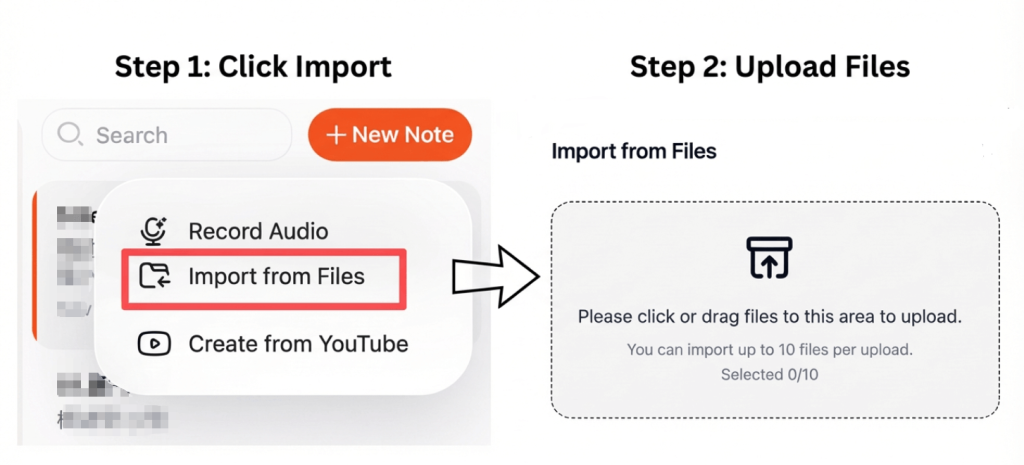
Välj en transkriptionsplattform som stöder M4A-uppladdningar. De flesta moderna verktyg låter dig ladda upp filer direkt från din enhet eller molnlagring.
För optimalt resultat:
- Använd inspelningar av hög kvalitet
- Minska bakgrundsljudet
- Se till att högtalarna är tydliga och lätta att förstå.
Klar och ren ljudkvalitet förbättras avsevärt noggrannhet i transkriptionen.
Steg 2: Konvertera M4A-ljudet till text automatiskt
När filen har laddats upp analyserar transkriptionsverktyget ljudet och omvandlar tal till skriftlig text. Avancerad AI kan hantera olika accenter, sätta punkt i meningar och organisera innehållet i läsbara avsnitt.
Vissa plattformar stöder också video till text, vilket innebär att du kan använda samma arbetsflöde för att transkribera ljud som extraherats från videofiler med jämn noggrannhet.
Steg 3: Exportera transkriptet som ett Word-dokument
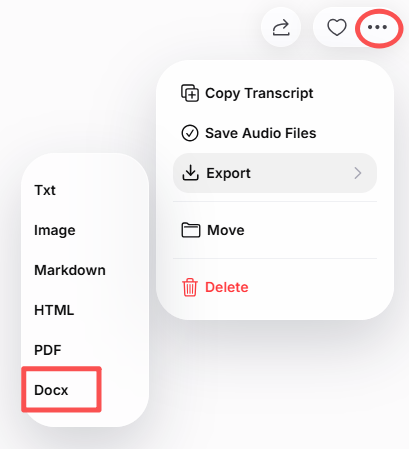
Efter transkriberingen, granska texten för eventuella fel eller formateringsjusteringar. Exportera den sedan som ett Word-dokument (.docx).
Med Word-filen kan du:
- Redigera och formatera innehåll enkelt
- Lägg till rubriker eller anteckningar
- Dela med kollegor eller studenter
- Spara för framtida referens
Många verktyg möjliggör även export i PDF- eller TXT-format för extra flexibilitet.
Bästa verktygen för att konvertera M4A till Word
Här är några pålitliga verktyg för att konvertera M4A-ljud till Word-dokument:
- VOMO – Noggrann, snabb transkription med ren Word-export
- Otter AI – Perfekt för möten, föreläsningar och intervjuer
- Notta – Stöder flera språk och dialekter
- Descript – Perfekt för innehållsskapare och poddare
- Öppna transkriptionsverktyg – Lämplig för utvecklare och forskare
Dessa verktyg utnyttjar avancerade ljud till text algoritmer för att producera mycket exakta och redigerbara transkriptioner.
Tips för att få så exakta transkriptioner som möjligt
För att säkerställa högsta transkriptionskvalitet:
- Spela in i en lugn miljö
- Tala tydligt och i ett jämnt tempo
- Undvik överlappande tal
- Välj rätt språk och accent
- Korrekturläs transkriptet innan slutlig export
Även små förbättringar av ljudets klarhet kan öka noggrannheten avsevärt.
Slutsats
Att konvertera M4A-ljud till ett Word-transkript med hjälp av AI är snabbt, effektivt och praktiskt. Genom att ladda upp ditt ljud, låta AI transkribera det och exportera resultatet som ett Word-dokument kan du skapa ett rent, redigerbart och sökbart transkript på några minuter.
Oavsett om det gäller föreläsningar, möten, intervjuer eller poddsändningar gör den här metoden det enklare att redigera, dela och återanvända ditt ljudinnehåll.




