

Timestamps are essential for making video and audio transcriptions organized, accessible, and highly usable. They allow readers to navigate long content, highlight key moments, and reference important sections in legal, educational, or marketing contexts.
In this guide, we’ll walk you through everything you need to know about timestamps—and how to use them effectively in real-world workflows.

什麼是謄本中的時間戳記?
Time-stamping in transcriptions refers to adding time markers or timecodes (e.g., 00:01:30) to your text to indicate when each segment of speech occurs. The standard format is HH:MM:SS (小時:分鐘:秒)。
HH:MM:SS (Hours:Minutes:Seconds)
Adding timestamps not only organizes your transcript but also makes it easier to:
- Locate specific sections
- Create short clips
- Reference key moments
Timestamp Formats Comparison (Best Use Cases)
| 格式 | 最適合 | 優點 | 優點 |
|---|---|---|---|
| SRT | Subtitles & video platforms | Widely supported, auto-sync | Less readable for humans |
| TXT + timestamps | Reading & SEO | Easy to scan and search | Not usable for subtitles |
| 字級時間戳 | Editing & precision tasks | 高度精確 | Complex and heavy |
| Sentence-level timestamps | Most use cases | Clean and readable | Slightly less precise |
Why Timestamps Matter More Than You Think in Long Videos
After working with long-form content like 播客, interviews, and webinars, one thing becomes clear:
Without timestamps, transcripts are almost unusable.
在真實情境中:
- A 1-hour transcript can exceed 10,000 words
- Finding a single quote becomes difficult
- Users often rewatch the video instead
Timestamps turn transcripts into navigable systems, not just static text.
時間戳類型
Different transcription projects require different timestamping methods:
1.開始-結束時間戳記
Add timestamps at the beginning and end of key sections or a significant portion of the transcript. This method works well for interviews, 會議, or presentations that don’t begin immediately with the key points.
範例:
Podcaster: [00:10:07] Hi, Mr. Jones, it’s great to have you on the show.
Podcaster: Thank you for your time, sir. We look forward to having you again soon. [01:01:52]
2.週期性時間戳記
Add timestamps at fixed intervals.
範例:
Speaker: Good day, everyone. [00:00:30] I will try to be concise and fast without leaving out key points. [00:01:00] Let’s get started.
3.喇叭變更時間戳記
Add timestamps when the speaker changes.
範例:
Journalist: [00:34:51] Can you share your company’s achievements in Q4 2023?
Chairman: [00:36:18] We increased production to almost double the previous quarters.
4.句子層級的時間戳記
Add timestamps for each sentence.
範例:
Presenter: [00:01:02] Good evening, everyone. [00:01:20] Welcome to our show.
5.不可聽標記
Mark unclear audio sections.
範例:
Speaker: I ran into a heavy [inaudible 00:00:08] that lasted an hour.
Sentence-Level vs Word-Level Timestamps: What Actually Works
When deciding timestamp precision, there are trade-offs:
Sentence-Level
- Clean and readable
- Easier to generate
- Suitable for most use cases
Word-Level
- Highly precise
- Useful for editing and syncing
- More complex and harder to maintain
In most workflows, sentence-level timestamps provide the best balance between accuracy and usability.
The Most Common Problem: Inaccurate or Misaligned Timestamps
One of the biggest challenges is accuracy.
實際上:
- Timestamps may drift from actual audio
- Segments can overlap
- Timing may not match speaker changes
Even small inaccuracies can break usability—especially for subtitles or editing.
Using inconsistent formats (like mixing up SRT and custom internal workflows) often leads to extra manual cleanup and compatibility issues. This is why using 頂級 AI 謄寫服務 is highly recommended.
Why Timestamp Format Matters (SRT vs TXT vs Custom)
Different formats serve different purposes:
SRT Format
- Ideal for subtitles
- Widely supported
TXT with Timestamps
- Best for reading and SEO
- Easy to search
Custom Formats
- Used for internal workflows
Using inconsistent formats often leads to extra manual cleanup and compatibility issues.
How Timestamps Enable Search, Navigation, and Content Extraction
Timestamps significantly improve usability.
They allow you to:
- Jump to specific sections instantly
- Search keywords and find exact moments
- Extract quotes efficiently
This is especially valuable for:
- 內容創造者
- 研究人員
- 編輯
新增時間戳記的最佳作法
To ensure high-quality results:
- Align timestamps accurately with audio
- Use AI tools to speed up the process
- Choose the right method (periodic, speaker-based, etc.)
- Maintain consistent formatting
Why Most Timestamp Workflows Still Require Manual Cleanup
Even with AI tools, timestamping is rarely perfect.
In real workflows:
- Speaker labels may need editing
- Timing may need adjustment
- Formatting often requires cleanup
Manual review is still essential for professional-quality transcripts.
When to Use Timestamps (And When You Don’t Need Them)
Not every transcript requires timestamps.
Use timestamps when:
- Content is long-form
- Navigation is important
- You need references
Skip timestamps when:
- Content is short
- Only summaries are needed
- Readability is the priority
Timestamps for Video Editing and Subtitle Workflows
In video production, timestamps are critical.
They allow you to:
- Sync subtitles accurately
- Cut clips precisely
- Align audio and visuals
Without timestamps, editing becomes slower and less precise.
Building a Knowledge System with Timestamped Transcripts
One advanced use case is knowledge management.
With timestamped transcripts:
- Each moment becomes searchable
- Content can be stored and reused
- Information becomes structured
這個 transforms transcripts into long-term knowledge assets.
使用 VOMO 加入時間戳記
基於實際經驗、 VOMO 是一款人工智能驅動的轉錄工具,可簡化時間戳記的添加:
- 登入您的 VOMO 帳戶,並前往儀表板。
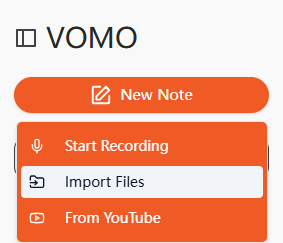
- 按一下 匯入檔案 並上傳您的視訊/音訊檔案,或從支援的平台貼上 URL。
- VOMO 自動產生一個 video to text transcript with accurate timestamps.
- 必要時編輯喇叭名稱或部分,然後匯出為 TXT 或 SRT.
結果: You will save hours compared to manual transcription, with accuracy up to 98%, even for long interviews or webinars.
A Better Workflow: Transcript + Timestamp + Summary Together
The most effective workflow combines three elements:
- Transcription (speech → text)
- Timestamps (navigation)
- Summary (insights)
This allows you to:
- Understand content quickly
- Navigate instantly
- Extract key insights efficiently
時間戳如何改善 SEO 與參與度
Timestamps also improve content performance:
- Increase watch time by enabling quick navigation
- Make transcripts indexable by search engines
- Improve discoverability through structured content
範例:
[00:00:00] Introduction
[00:03:45] Key Concepts
[00:07:20] Practical Implementation
Frequently Asked Questions About Timestamps
How do I add timestamps to a transcript?
You can add timestamps manually or use AI tools that automatically align text with audio. Most modern tools generate timestamps during transcription.
What is the best timestamp format for videos?
SRT is best for subtitles, while TXT with timestamps is better for reading, SEO, and content repurposing.
Are timestamps necessary for transcription?
Not always. They are essential for long-form content like videos and podcasts but unnecessary for short clips or summaries.
Why are my timestamps inaccurate?
Timestamps can drift due to background noise, overlapping speech, or poor 音質. Manual correction is often needed.
Can I generate timestamps automatically?
是的。 AI 轉錄 tools can automatically generate timestamps, often with high accuracy and minimal editing required.
What’s the difference between timestamps and subtitles?
Timestamps mark when speech occurs, while subtitles display that speech on screen. Subtitles usually include timestamps in SRT format.
Should I use word-level timestamps?
Only if you need precise editing or syncing. For most use cases, sentence-level timestamps are more practical.
總結
Timestamps transform transcriptions from simple text into powerful, navigable content systems.
They improve accessibility, enhance user experience, and unlock new ways to repurpose content.
While manual timestamping is possible, AI tools like VOMO streamline the process—delivering accurate, structured, and highly usable transcripts in minutes.
If you want to make your video content more accessible, searchable, and valuable, mastering timestamps is no longer optional—it’s essential.
時間戳記對於組織、存取和高度可用的視訊和音訊轉錄來說非常重要。 它們可讓讀者瀏覽冗長的內容、突顯關鍵時刻,甚至在法律、教育或行銷情境中參考重要的章節。在本指南中,我們將教您瞭解有關時間戳的所有知識,以及如何有效地實作時間戳。
什麼是謄本中的時間戳記?
轉錄中、 時間戳記 是指在您的文字中加入時間碼,以指示每段語音的出現時間。標準格式為 HH:MM:SS (小時:分鐘:秒)。
加入時間標記不僅能整理您的筆記本,還能讓您更容易找到特定部分、建立簡短片段,或在法律或專業情況下使用筆記本作為證據。
時間戳類型
不同的轉錄專案需要不同的時間戳記方法。以下是最常見的幾種:
1.開始-結束時間戳記
在謄本重要部分的開始和結束處加入時間戳記。此方法適用於並非以重點立即開始的訪談、會議或簡報。
範例:
Podcaster:[00:10:07] 嗨,瓊斯先生,很高興您能上節目。
Podcaster:謝謝您抽空,先生。我們期待您的再次光臨。[01:01:52]
2.週期性時間戳記
以固定的間隔加入時間戳記 (例如每 30 秒、1 分鐘或 5 分鐘)。非常適合需要連續導覽的長篇內容。
範例:
講者:大家好。[00:00:30] 我會盡量簡潔快速,不遺漏重點。[00:01:00] 讓我們開始吧。
3.喇叭變更時間戳記
每當發言人改變時,就放置時間戳記。此方法廣泛用於訪談、播客和小組討論。
範例:
記者:[00:34:51] 能否分享貴公司在 2023 年第四季的成果?
董事長:[00:36:18] 我們的產量增加到幾乎是前幾個季度的兩倍。
記者:[00:40:02] 感謝您的見解。
4.句子層級的時間戳記
在每個句子的開頭加入時間戳記。這種方式較不常見,因為可能會顯得擾民,但對於高度詳細的法律或研究謄本很有用。
範例:
簡報人:[大家晚上好。[00:01:20] 歡迎收看我們的節目。
5.不可聽標記
使用時間戳記標示不清楚或遺失的音訊部分。
範例:
講者:我遇到了一場持續了一個小時的大[聽不清 00:00:08] 。幸運的是,我可以在城市周圍操控 [聽不清 00:01:10] 。
新增時間戳記的最佳作法
- 將時間戳與音訊精確對齊 以確保清晰度。
- Use AI transcription tools 以節省時間並提昇精確度。
- 選擇時間戳記方法 適合內容類型 (定期、更換講者等)。
- 保持格式一致 的可讀性和可用性。
使用 VOMO 加入時間戳記
時間戳如何改善 SEO 與參與度
- 時間戳可讓檢視者 直接跳到關鍵部分,改善觀看時間和保留率。
- 正確格式化的謄本使內容 可被搜尋引擎索引,提升能見度。
- 新增 時間戳標題中的關鍵字 可以進一步增強可發現性。
SEO 友好型時間戳範例格式:
[00:00:00] 視訊轉錄簡介
[00:03:45] 為什麼時間戳可以提高參與度?
[00:07:20] 如何使用 VOMO 添加時間戳記
總結
轉錄中的時間戳可提升內容的價值和可用性。它們可協助觀眾瀏覽音訊和視訊、突顯重要觀點,甚至在法律或專業背景下提供協助。
雖然可以使用手動時間戳,但使用人工智能工具如 VOMO 簡化流程、提供精確的時間碼,並節省工時。遵循這裡列出的最佳作法,您可以建立 可存取、有條理且適合 SEO 的謄本 為觀眾和客戶帶來最大價值。
