

Ja, Microsoft Copilot kan notities maken van vergaderingen, Maar alleen binnen het Microsoft ecosysteem en met bepaalde beperkingen. Copilot helpt bij het samenvatten van vergaderingen, het markeren van belangrijke punten en het ophalen van actiepunten uit gesprekken die worden gevoerd in tools zoals Microsoft Teams. Het werkt echter niet als een volledig onafhankelijke notulist voor vergaderingen en is sterk afhankelijk van bestaande Microsoft apps, toestemmingen en transcripties.
Hieronder staat een duidelijk overzicht van wat Microsoft Copilot kan doen voor vergadernotities, waar het tekortschiet en wanneer het zinvol is om het te gebruiken.
Voor teams die een meer volledige workflow, VOMO werkt als een AI-vergadernotulist die automatisch vergaderingen transcribeert en gestructureerde notities genereert met behulp van ingebouwde sjablonen, zodat belangrijke beslissingen en actiepunten met minimale handmatige inspanning worden vastgelegd.

Hoe Microsoft Copilot vergadernotities maakt
Microsoft Copilot genereert vergaderingsnotities door het analyseren van vergadergegevens uit Microsoft Teams, Outlook en Microsoft 365-documenten. Tijdens of na een vergadering kan het discussies samenvatten, beslissingen blootleggen en actiepunten voorstellen op basis van de context van de conversatie.
Copilot werkt het beste wanneer vergaderingen al zijn vastgelegd binnen de Microsoft-omgeving, waar transcripties, chatlogs en gedeelde documenten beschikbaar zijn. Het richt zich op het omzetten van bestaande inhoud in gestructureerde samenvattingen in plaats van te fungeren als een standalone vergaderrecorder.
Wat Microsoft Copilot goed kan doen voor vergaderingen
Microsoft Copilot is effectief in het verbeteren van duidelijkheid en opvolging voor teams die al Microsoft-tools gebruiken.
Sterke punten zijn onder andere:
- Lange vergaderingen samenvatten in beknopte overzichten
- Beslissingen en volgende stappen benadrukken
- Vragen beantwoorden als “Wat heb ik gemist?”.”
- Relevante context halen uit e-mails, agenda's en documenten
Voor interne teamvergaderingen kan dit handmatige notities verminderen en deelnemers helpen snel bij te praten.
Beperkingen van Microsoft Copilot voor vergadernotities
Ondanks zijn sterke punten heeft Microsoft Copilot belangrijke beperkingen.
Het kan niet zelfstandig vergaderingen opnemen of gesprekken buiten Microsoft Teams vastleggen. Het is ook afhankelijk van of transcriptie is ingeschakeld en toegankelijk is. Als een vergadering niet goed is opgenomen of getranscribeerd, heeft Copilot weinig om mee te werken.
Bovendien zijn de resultaten van Copilot gebonden aan Microsoft machtigingen en tenant instellingen, die de toegang of het delen tussen teams en externe deelnemers kunnen beperken.
Ondersteunt Microsoft Copilot audio- en videotranscriptie?
Microsoft Copilot voert zelf geen transcriptie uit. In plaats daarvan vertrouwt het op Microsoft Teams en verwante diensten om gesprekken om te zetten van audio naar tekst voordat Copilot ze kan analyseren.
Voor videogerelateerde vergaderingen geldt dezelfde beperking. Copilot kan ruwe videobestanden niet zelf verwerken. De vergadering moet eerst door Microsofts transcriptiepijplijn, die de discussie converteert van video naar tekst voordat Copilot samenvattingen of notities kan genereren.
Beste gebruikssituaties voor Microsoft Copilot-vergadernotities
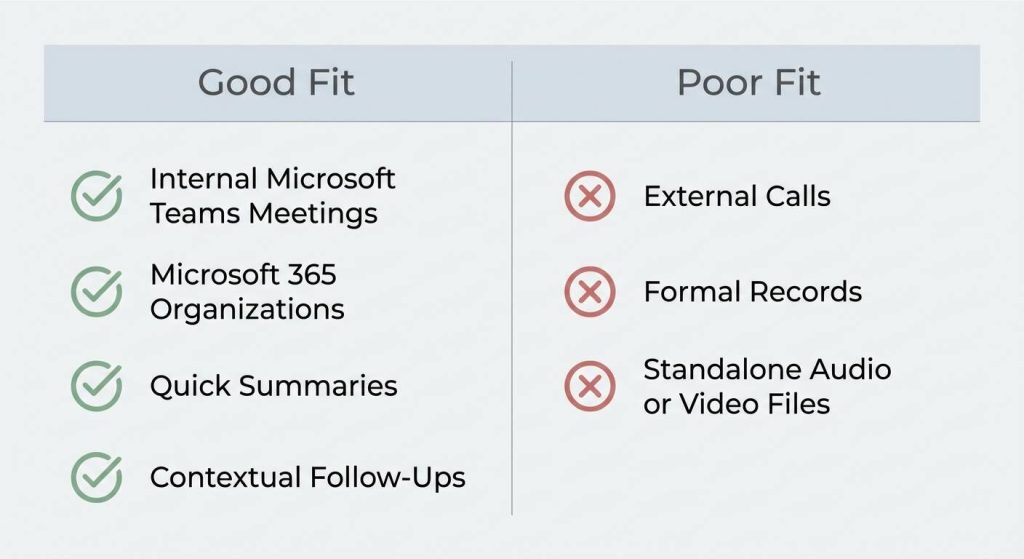
Microsoft Copilot werkt het beste in deze scenario's:
- Interne Microsoft Teams-vergaderingen
- Organisaties volledig geïnvesteerd in Microsoft 365
- Teams die snelle samenvattingen nodig hebben in plaats van formele dossiers
- Kenniswerkers die contextuele follow-ups willen gekoppeld aan e-mails en bestanden
Voor deze gebruikssituaties kan Copilot een nuttige productiviteitslaag zijn.
Microsoft Copilot vs. specifieke AI-tools voor vergadernotities
Microsoft Copilot is een algemene productiviteitsassistent, terwijl speciale Notitie AI-vergadering tools zijn speciaal ontworpen voor vergaderingen van begin tot eind.
Specifieke tools bieden meestal:
- Automatisch opnemen van vergaderingen
- Ingebouwde transcriptie
- Identificatie spreker
- Gestructureerde notities en actiepunten
- Consistente sjablonen voor alle vergaderingen
Copilot richt zich daarentegen op het samenvatten en analyseren van content die al bestaat binnen het ecosysteem van Microsoft in plaats van op het beheren van de volledige workflow voor vergaderdocumentatie.
Moet je Microsoft Copilot gebruiken voor vergadernotities?
Als je vergaderingen al plaatsvinden in Microsoft Teams en je snelle samenvattingen en contextbewuste follow-ups wilt, kan Microsoft Copilot een goede optie zijn.
Als je echter behoefte hebt aan end-to-end vastlegging van vergaderingen, consistente opmaak of tools die werken op verschillende platforms en vergadertypes, is Copilot alleen misschien niet genoeg. In die gevallen levert het combineren van Copilot met een speciale AI-oplossing voor vergadernotities vaak betere resultaten op.
Veelgestelde vragen
Kan ChatGPT notities maken van vergaderingen?
Ja, ChatGPT kan helpen met vergadernotities, Maar het neemt zelf geen vergaderingen op. Het werkt het beste na een vergadering, nadat je schriftelijke notities of een transcript hebt gemaakt. ChatGPT kan discussies samenvatten, beslissingen selecteren en actiepunten formatteren, waardoor het eerder nuttig is als documentatiehulp na een vergadering dan als notulist voor een volledige vergadering.
Kan Tweelingen notities maken van vergaderingen?
Gemini kan helpen met vergadernotities door het analyseren en herstructureren van bestaande tekst, zoals transcripties of geschreven notities. Net als ChatGPT neemt het niet zelfstandig vergaderingen op of transcribeert het niet zelfstandig. Gemini is het meest effectief in combinatie met tools voor het vastleggen en transcriberen van vergaderingen, waardoor het het volgende kan doen focus op samenvatten, analyse en verfijning.




