


غير مسموح لك بالتسجيل لقاء جوجل ميت لأن التسجيل ميزة متميّزة تقتصر على بعض خطط Google Workspace. يمكن لعوامل مثل نوع الحساب، وإعدادات المسؤول، وأذونات المضيف، وقيود الجهاز، وتوافر مساحة التخزين، وحالة غرفة الاستراحة، أن تمنع التسجيل. على سبيل المثال، لا يمكن لحسابات Gmail الشخصية أو باقات Workspace ذات المستوى الأدنى مثل Business Starter تسجيل الاجتماعات، وحتى إذا كان لديك حساب مدفوع، فقد تقيّد إعدادات المسؤول أو قواعد إدارة المضيف إمكانية الوصول.
إذا لم تتمكن من تسجيل لقاء جوجل الخاص بك, فومو مدون ملاحظات الاجتماع بالذكاء الاصطناعي التقاط اجتماعاتك وتدوينها تلقائيًا، وبنقرة واحدة فقط على جهازك المحمول، يمكنك تدوين الملاحظات الكاملة لاجتماعات الذكاء الاصطناعي بنقرة واحدة.

الأسباب الشائعة لعدم توفر التسجيل
الحسابات الشخصية
التسجيل متاح فقط للمدفوع حسابات Google Workspace تُستخدم للعمل أو المدرسة. لا تحتوي حسابات Gmail المجانية على ميزة التسجيل.
القيود الإدارية
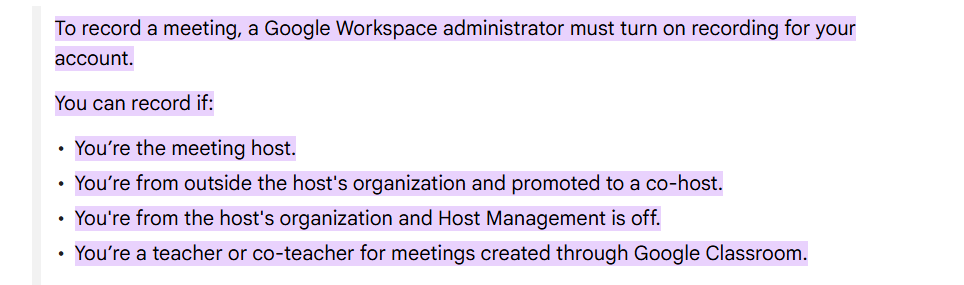
يجب أن يقوم مسؤولو Google Workspace بتمكين التسجيل في وحدة تحكم المسؤول. إذا قام حسابك أو مؤسستك بتعطيل هذه الميزة، فلن ترى خيار التسجيل أثناء الاجتماعات.
حدود خطة العمل
خطط عمل Google Workspace معينة، مثل Business Standard أو Enterprise أو Education Plus, تتضمن التسجيل. لا تدعم الباقات ذات المستوى الأدنى مثل Business Starter هذه الميزة.
أذونات المضيف
يمكن فقط لمضيف الاجتماع أو المضيف المشارك (إذا كان مسموحًا به) بدء التسجيل. إذا قامت إدارة المضيف بتقييد التسجيل، لا يمكن للمشاركين الآخرين - حتى في الحسابات المؤهلة - تسجيل الاجتماع.
قيود الجهاز
التسجيل مدعوم فقط على أجهزة الكمبيوتر التي تستخدم متصفح الويب, وليس على الهواتف المحمولة أو الأجهزة اللوحية.
أصل الاجتماع
قد لا تدعم الاجتماعات التي تبدأ من أجهزة غرفة الاجتماعات أو بعض المكونات الإضافية التابعة لجهة خارجية التسجيل.
غرف الاستراحة
لا يتوفر التسجيل أثناء وجودك في غرفة فرعية، حتى إذا كان يتم تسجيل الجلسة الرئيسية.
التخزين غير كافٍ
يجب أن يكون لدى منظم الاجتماع مساحة تخزين كافية على Google Drive للتسجيلات. إذا كانت مساحة تخزين المنظم ممتلئة، فسيفشل التسجيل.
كيفية إصلاح مشكلات التسجيل في Google Meet
اتصل بمسؤولك
اطلب من مسؤول مساحة العمل تمكين التسجيل لحسابك وتأكد من تنشيط الإعداد في وحدة تحكم المسؤول.
تحقق من نوع حسابك
تأكد من استخدامك لـ حساب العمل أو المدرسة مع خطة Google Workspace الصحيحة التي تدعم التسجيل.
استخدام الكمبيوتر
انضم إلى الاجتماع من متصفح الكمبيوتر المحمول أو سطح المكتب للوصول إلى ميزات التسجيل، حيث إن الأجهزة المحمولة غير مدعومة.
التحقق من أذونات المضيف
تأكد من أن إعدادات إدارة المضيف تسمح لك بالتسجيل. إذا تم تنظيم الاجتماع من قبل شخص آخر، اطلب من المضيف منح حق الوصول إلى التسجيل.
توفير مساحة تخزين مجانية
تحقق من مساحة التخزين في Google Drive للتأكد من وجود مساحة كافية لتسجيلات الاجتماعات، وقم بإخلاء المساحة إذا لزم الأمر.
الخاتمة
التسجيل في Google Meet يمكن تقييده لعدة أسباب، بما في ذلك نوع الحساب وإعدادات المسؤول وقيود الخطة وقيود الجهاز وقيود التخزين. يساعدك فهم هذه العوامل على تحديد سبب عدم توفر خيار التسجيل واتخاذ خطوات لإصلاحه. من خلال التأكد من صحة خطة مساحة العمل والأذونات وإعداد الجهاز، يمكنك تمكين التسجيل لاجتماعاتك والتقاط المناقشات المهمة بكفاءة.
