

Microsoft TeamsでAIミーティングノートを取る方法
Microsoft Teamsの会議中に詳細なメモを取ることは、特にすべてを入力するのではなく、議論に集中する必要がある場合、困難な場合があります。Microsoft Teamsは、AIを搭載した複数の共同メモ作成ツールを提供し、ディスカッションを自動的に要約し、重要なポイントをハイライトし、実用的なミーティングメモを作成します。これらのツールを使用することで、チームは文書作成タスクにかかる時間を週に数時間節約し、見落としがないようにすることができます。.
もっと予算を抑えたいなら、, VOMO AI ミーティング・ノートテイカー はチームを補完することができる。それは リアルタイムのテープ起こし 高額なサブスクリプションを必要とせず、AIが要約を生成するため、個人や小規模なチームにとって実用的なソリューションとなっている。.

Microsoft Teamsの共同ノート機能の使い方
会議の前に
コラボレーティブノートでは、参加者が手動でメモを追加し、会議中にリアルタイムで表示することができます。設定方法
- Microsoft Teamsを開き ミーティング タブ
- 選択 ミーティングの予約.
- クリック 会議のメモを追加する をクリックします。会議中に共有ペインに表示される議題、メモ、タスクを追加します。.
会議中
- アクティブなTeamsミーティングで 備考 をクリックしてください。
- を使用する。 会議メモペイン アジェンダを作成し、メモを入力し、リアルタイムでタスクを追跡します。.
ミーティング後のメモへのアクセス
- Microsoft Teamsを開き カレンダー.
- レビューしたい会議を選択し 会議の詳細を拡大する > 詳細 > 備考.
- ノートはMicrosoft 365の検索で会議名で検索することも可能です。.
コラボレーティブ・ノートの利点
- 参加者全員が編集可能な箇条書きの構造化。.
- TeamsチャットやOneNoteなど、Microsoft 365アプリ全体で同期。.
- 会議後、レビューや編集のためにアクセス可能。.
制限事項
- 手入力が必要で、気が散ることがある。.
- 話し言葉は自動的に取り込まれません。.
- 書式オプションが限られており、マイクロソフトのアプリ以外では簡単にエクスポートできない。.
- パブリックプレビュー機能を有効にした職場または学校のアカウントを持つ組織のみが利用できます。.
Microsoft Teamsのインテリジェント・リキャップ機能の使い方
インテリジェント・リキャップとは何か
インテリジェント・リキャップはAIを搭載した機能で、記録された会議を分析し、生成する:
- 色分けされたミーティング・トピック
- タイムラインマーカー付きチャプター
- 要約メモ
- アクション・アイテム
を使用している。 AIトランスクリプション と自然言語処理により、Teams Premiumユーザーのための迅速なサマリーとタスクを作成します。.
インテリジェント・リキャップを有効にする方法
- 会議で もっと見る > 記録と転写.
- 選ぶ 録音開始 または テープ起こし開始.
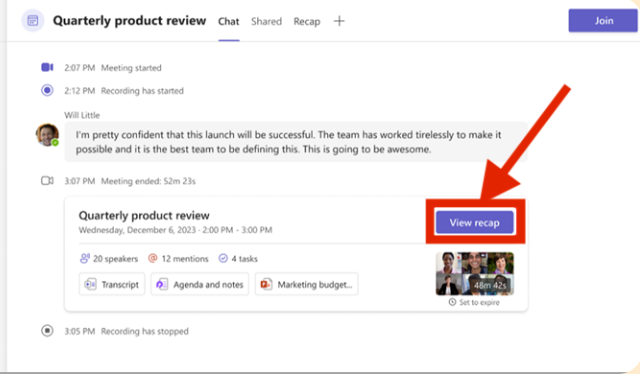
- ミーティング終了後 カレンダー, をクリックし、ミーティングを選択して 総括 タブ
インテリジェント・リキャップ・ノートの利点
- メモやタスクの出発点となる。.
- 25言語をサポート。.
- 会議出席者全員が利用可能。.
- メモの編集は会議の後でも可能です。.
制限事項
- Teams Premiumライセンスが必要です。.
- AIが生成したコンテンツは、正確性を確認する必要があるかもしれない。.
- 録音・録画された会議でのみ機能します。.
Microsoft TeamsのAI生成メモ機能の使い方
AIが作成したノートとは
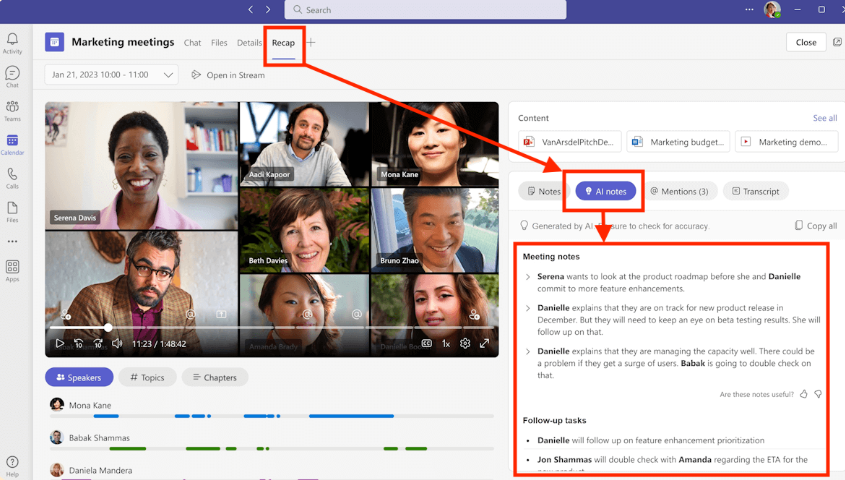
AIが作成したノート は、予定されたミーティングを自動的に書き起こし、主要なディスカッションポイントを要約します。これらのメモは 総括 タブを作成し、構造化された要約とアクション・アイテムを提供する。.
AIが生成するノートを有効にする方法
- チームを開き、次のページに進む。 カレンダー.
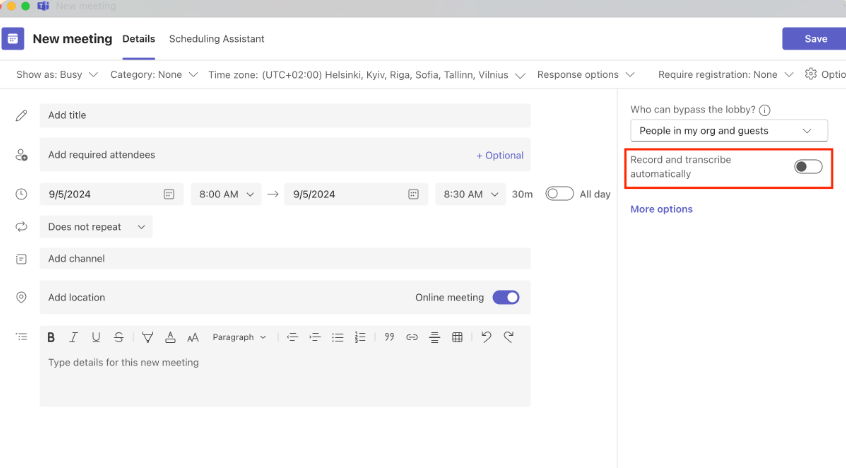
- 新しいミーティングを予定する。.
- オン AIが作成したメモ 招待状を送る前に.
- 会議中に、以下の方法でAIメモを有効にすることもできます。 備考 > キラキラアイコン.
会議後にAIが作成したメモにアクセスする
- に行く。 チャット タブをクリックします。.
- AIメモが有効になっている会議チャットを選択します。.
- クリック 総括 をクリックすると、トランスクリプト、サマリー、推奨タスクが表示されます。.
メリット
- 手作業でのメモ取りが不要に。.
- 参加者は、会議中または会議後にメモを編集することができます。.
- 即座にサマリーとアクション・アイテムを提供。.
制限事項
- インスタント・ミーティングやチャンネル・ミーティングではなく、スケジュールされたミーティングにのみ利用できます。.
- Microsoft 365 Copilotライセンスとパブリックプレビューアクセスが必要です。.
- AIの要約は正確性を確認する必要があるかもしれない。.
VOMOをAIノートの補完ツールとして使う
Teams Premiumにアクセスできない場合、または以下をご希望の場合 リアルタイムAIノート 高額な購読料なしで、, VOMO AI ミーティング・ノートテイカー は素晴らしい選択肢だ:
- Microsoft Teamsミーティングのライブトランスプリントをキャプチャします。.
- AIを活用したサマリーとアクションアイテムを即座に生成。.
- より明確に、より深く理解するために、トランスクリプトと対話することができます。.
- ライセンス費用を追加することなく、複数の会議で使用できます。.
VOMOは、正確で実用的なミーティングノートを維持しながら、チームの時間を節約するのに役立ちます。.
Microsoft TeamsにおけるAIミーティングノートのベストプラクティス
- 正確なAI要約のために、常にテープ起こしを有効にしてください。.
- 会議を記録し、インテリジェント・リキャップの効果を最大化する。.
- AIが作成したメモをレビューし、完全性と文脈を確認する。.
- 会議後すぐにメモやタスクを共有し、迅速な調整を実現。.
- TeamsのAIツールとVOMOを組み合わせることで、予算に応じたリアルタイムのサマリーを作成できます。.
結論
使用会議のメモを取るAI で マイクロソフトチーム を使用すると、生産性が劇的に向上し、会議への参加に気を取られることなく、すべてのディスカッションポイント、アクションアイテム、および決定が正確にキャプチャされるようになります。コラボレーティブ・ノート、インテリジェント・リキャップ、AI生成ノートを活用することで、チームは構造化された実用的なドキュメントを維持しながら、週に数時間を節約することができます。費用対効果の高い代替案やリアルタイムのAIサポートをお探しの方へ、, VOMO AI ミーティング・ノートテイカー は、シームレスな書き起こしとAIサマリーを提供し、すべての会議を簡単に把握することができます。このようなAIツールを導入することで、チームは手作業でメモを取るのではなく、コラボレーションと意思決定に集中することができます。.




